
Resolution and Perceived Quality Gaps in 1080p Streaming
Selecting “1080p Full HD” inside a streaming application on a modern television frequently delivers a surprisingly disappointing visual experience. Viewers expecting the razor-sharp clarity, deep shadow details, and fluid motion of physical media often find themselves staring at soft textures, muddy dark scenes, and distracting pixelation (macroblocking) during high-action sequences.
This visual gap stems from a fundamental misunderstanding of digital video specifications. Resolution (1920×1080) merely defines the physical grid of pixels rendered on a display; it says nothing about the visual integrity of the image within those pixels. True visual fidelity is governed by bitrate – the volume of video data processed per second – and video codec compression efficiency. Understanding why web streams compress video data so aggressively enables viewers to optimize their home displays, diagnose local network bottlenecks, and force peak picture performance from their streaming apps.

The bitrate gap: Physical Blu-ray vs. compressed web streams
The primary engineering reason a streaming 1080p movie looks inferior to a physical disc lies in the sheer difference in data throughput.
A standard 1080p physical Blu-ray disc delivers a continuous video bitrate ranging from 25 to 40 Mbps (Megabits per second). By comparison, major Over-The-Top (OTT) streaming services – such as Netflix, YouTube, or Amazon Prime Video – compress their 1080p video streams down to an average of 3 to 8 Mbps. This represents a massive ~80% reduction in data throughput.
To achieve this extreme data compression, streaming algorithms strip away fine spatial detail. The encoder sacrifices microscopic textures—such as skin pores, individual fabric threads, fine film grain, and subtle background foliage. In dark scenes where data allocation is crushed further, low bitrates cause macroblocking (where smooth gradients break down into blocky, pixelated squares) and color banding (where smooth shadows separate into harsh, stair-stepped rings of color).
Video bitrate and encoding benchmark matrix across delivery formats
To evaluate how data throughput directly dictates visual fidelity across different distribution channels, review this technical benchmark matrix:
| Delivery format | Typical bitrate (Mbps) | Primary video codec | Perceived visual fidelity & artifacts |
| Physical 1080p Blu-ray | 25 – 40 Mbps | H.264 / AVC (High Profile) | Master Quality. Full grain preservation, zero macroblocking, razor-sharp textures. |
| High-Bitrate OTT (YouTube/Vimeo) | 8 – 15 Mbps | AV1 / VP9 / HEVC | High Quality. Clean highlights, minimal noise, solid detail retention in motion. |
| Standard OTT (Netflix/Prime/Disney+) | 3 – 7 Mbps | AV1 / HEVC / H.264 | Moderate Quality. Soft background textures, minor color banding in dark scenes. |
| Low-Bandwidth Mobile Stream | 1.5 – 3 Mbps | H.264 / HEVC | Low Quality. Visible macroblocking, heavy motion blur, pixelated gradients. |
Hardware scaling, display size, and TV picture processing
The physical hardware displaying the video stream heavily amplifies or masks these compression flaws depending on screen dimensions and internal processing algorithms.
The 4K TV upscaling multiplier
A compressed 3 Mbps 1080p stream may look perfectly sharp when viewed on a 24-inch 1080p desktop monitor because the pixel density is high and the physical screen area is small.
However, when that exact same 1080p stream is sent to a 65-inch 4K Smart TV, the TV’s internal processor must stretch a 2-megapixel image (1920×1080) to fill an 8.3-megapixel display (3840×2160). This 4K upscaling process acts like a magnifying glass over video compression flaws. The upscaling engine fills in the missing 6 million pixels by interpolation, turning subtle compression softness into glaring, blurred edges across the large panel.
Sharpness processing and artificial noise amplification
Most consumer televisions leave factory picture presets set to aggressive enhancement modes. Features like “Sharpness” (often set to 50% or higher out of the box) or “Edge Enhancement” do not add real detail to a low-bitrate stream.
Instead, artificial sharpness algorithms inspect high-contrast borders and apply harsh white outlines around compression artifacts. This over-processing exaggerates macroblocking and digital compression noise, making a compressed 1080p stream look grainy, harsh, and significantly worse than if processed with neutral TV picture settings.
Diagnostic overlays and network throttling mitigation
Diagnosing whether a blurry stream is caused by platform-side compression or local network bottlenecks requires inspecting real-time playback telemetry.
Video stream stats and diagnostic overlays
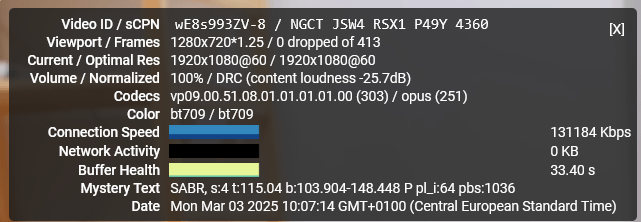
Major streaming platforms incorporate hidden technical overlays that display real-time video telemetry:
- YouTube: Right-click any video player and select “Stats for Nerds.” Inspect the Current / Optimal Res field (verifying if the viewport matches the stream) and the Connection Speed metric.
- Netflix: On smart TVs or web browsers (via Ctrl + Alt + Shift + D), trigger the diagnostic overlay to inspect the active Playing Bitrate (e.g., 3200 kbps / 1080p).
If your diagnostic overlay reveals that your connection speed is high, but the playing bitrate remains locked at 2,000 kbps, the platform’s server-side algorithm has capped the stream based on current regional network congestion or your specific subscription plan tier.
Wi-Fi packet loss vs. wired Ethernet stability
Streaming services utilize Adaptive Bitrate Streaming (ABR) algorithms. If your local Wi-Fi connection experiences temporary packet loss, signal interference, or latency spikes, the ABR algorithm instantly drops your video stream down to 720p or reduces the 1080p bitrate allocation to prevent the video player from buffering.
Connecting your Smart TV or streaming box directly via a wired Ethernet cable eliminates wireless signal fluctuations. A stable, hardwired connection ensures the ABR algorithm consistently requests the platform’s highest available 1080p bitrate profile without triggering mid-stream quality drops.